Refund Tool Example
A complete example of a refund processing tool using Tool Forge's IO and Block APIs.
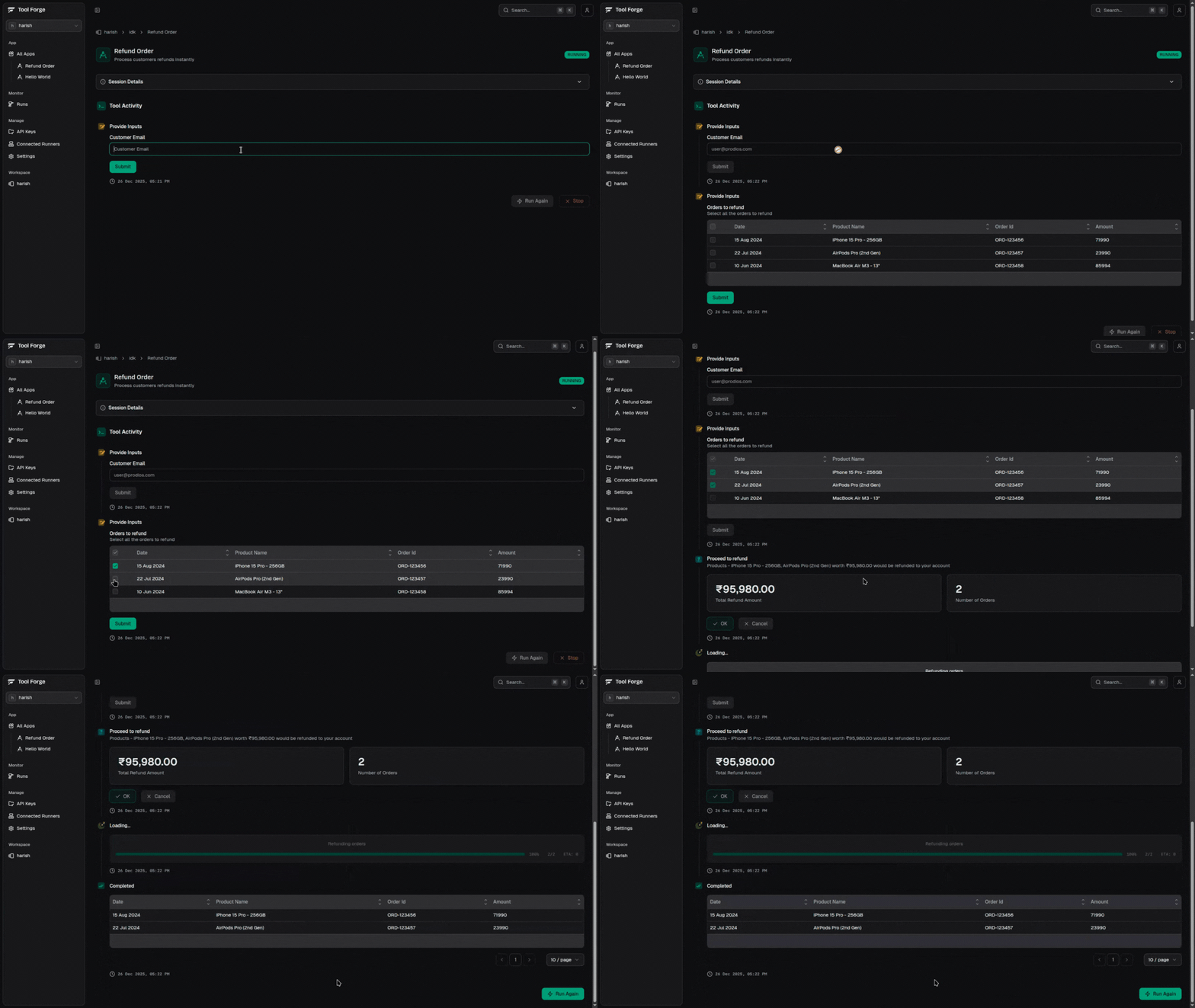
In this example, we'll build a complete refund processing tool that demonstrates how to:
- Collect user input with validation
- Display and select data from a table
- Show confirmation dialogs with rich content
- Process items with progress tracking
Use Case
Customer support teams often need to process refunds for orders. This tool allows support agents to:
- Look up a customer by email
- View their orders and select which ones to refund
- Confirm the refund amount before processing
- Track progress as refunds are processed
Step 1: Create the Tool
Start by creating a new tool file and setting up the basic structure:
import { defineTool } from '@toolforge-js/sdk/components'

export default defineTool({
  name: 'Refund Order',
  description: 'Process customers refunds instantly',
  handler: async ({ io, block }) => {
    // We'll build this step by step
  },
})
Every tool receives io for user interactions and block for creating rich
visual outputs.
Step 2: Get Customer Email
First, we need to collect the customer's email and fetch their orders. We'll use io.textInput() with email validation:
import { defineTool } from '@toolforge-js/sdk/components'
import { z } from 'zod'

import { getCustomerOrders } from '../-lib/order'

export default defineTool({
  name: 'Refund Order',
  description: 'Process customers refunds instantly',
  handler: async ({ io, block }) => {
    const customerEmail = await io.textInput({
      label: 'Customer Email',
      validationSchema: z.email(),
    })

    const orders = await getCustomerOrders(customerEmail)
    if (!orders.length) {
      return 'No orders found to refund'
    }
  },
})
Utility Files Convention
Any file or folder starting with - (like -lib/) is ignored by Tool Forge
when scanning for tools or agents. Use this convention for utility functions,
helpers, and shared code that shouldn't be treated as tools.
Here's a reference implementation of getCustomerOrders that fetches orders from a database:
import { db } from './db'

interface Order {
  id: string
  productName: string
  amount: number
  status: string
  createdAt: Date
}

export async function getCustomerOrders(email: string): Promise<Order[]> {
  // Fetch orders from your database
  const orders = await db.orders.findMany({
    where: {
      customer: { email },
      status: { in: ['completed', 'delivered'] },
    },
    orderBy: { createdAt: 'desc' },
  })

  return orders
}

export function getTotalRefundAmount(orders: Order[]): number {
  return orders.reduce((sum, order) => sum + order.amount, 0)
}

export function getProductNames(orders: Order[]): string {
  return orders.map((order) => order.productName).join(', ')
}

export async function refundOrder(order: Order): Promise<void> {
  // Process refund via payment gateway
  await db.orders.update({
    where: { id: order.id },
    data: { status: 'refunded' },
  })
}
The validationSchema ensures the user enters a valid email before proceeding. If no orders are found, we return early with a message.
Step 3: Select Orders with Table Input
Now we display the customer's orders in a table and let the agent select which ones to refund:
import { defineTool } from '@toolforge-js/sdk/components'
import { z } from 'zod'

import {
  getCustomerOrders,
  getTotalRefundAmount,
  getProductNames,
} from '../-lib/order'

export default defineTool({
  name: 'Refund Order',
  description: 'Process customers refunds instantly',
  handler: async ({ io, block }) => {
    const customerEmail = await io.textInput({
      label: 'Customer Email',
      validationSchema: z.email(),
    })

    const orders = await getCustomerOrders(customerEmail)
    if (!orders.length) {
      return 'No orders found to refund'
    }

    const ordersToRefund = await io.tableInput({
      label: 'Orders to refund',
      description: 'Select all the orders to refund',
      data: orders,
      mode: 'multiple',
    })

    if (ordersToRefund.length === 0) {
      return 'No orders selected for refund'
    }

    const totalRefundAmount = getTotalRefundAmount(ordersToRefund)
    const productName = getProductNames(ordersToRefund)
  },
})
The tableInput with mode: 'multiple' allows selecting multiple rows. We then calculate the total refund amount and product names for the confirmation step.
Step 4: Confirm with Rich Dialog
Before processing, we show a confirmation dialog with KPI cards displaying the refund summary:
const totalRefundAmount = getTotalRefundAmount(ordersToRefund)
const productName = getProductNames(ordersToRefund)

const shouldContinue = await io.confirm({
  title: 'Proceed to refund',
  description: `Products - ${productName} worth ${totalRefundAmount} would be refunded to your account`,
  block: block.layout({
    children: [
      {
        element: block.kpiCard({
          name: 'Total Refund Amount',
          value: totalRefundAmount,
          valueFormat: {
            type: 'currency',
            currency: 'INR',
          },
        }),
        colSpan: 6,
      },
      {
        element: block.kpiCard({
          name: 'Number of Orders',
          value: ordersToRefund.length,
        }),
        colSpan: 6,
      },
    ],
  }),
})

if (!shouldContinue) {
  return 'Refund cancelled'
}
The block parameter in io.confirm() allows us to embed rich visual components. Here we use:
block.layout()- Creates a grid layout with 12 columnsblock.kpiCard()- Displays key metrics with formatted valuescolSpan: 6- Each card takes half the width (6 of 12 columns)
Step 5: Process with Progress Loader
Finally, we process each refund and show progress to the user:
if (!shouldContinue) {
  return 'Refund cancelled'
}

const progress = await io
  .progressLoader({
    title: 'Refunding orders',
    itemsInQueue: ordersToRefund.length,
  })
  .start()

for (const order of ordersToRefund) {
  await refundOrder(order)
  await progress.increment()
}

return ordersToRefund
The progressLoader provides:
- Visual progress bar showing completion percentage
itemsInQueuesets the total count.start()begins the progress tracking.increment()updates progress after each item
Complete Code
Here's the final implementation:
import { defineTool } from '@toolforge-js/sdk/components'
import { z } from 'zod'

import {
  getCustomerOrders,
  refundOrder,
  getTotalRefundAmount,
  getProductNames,
} from '../-lib/order'

export default defineTool({
  name: 'Refund Order',
  description: 'Process customers refunds instantly',
  handler: async ({ io, block }) => {
    const customerEmail = await io.textInput({
      label: 'Customer Email',
      validationSchema: z.email(),
    })

    const orders = await getCustomerOrders(customerEmail)
    if (!orders.length) {
      return 'No orders found to refund'
    }

    const ordersToRefund = await io.tableInput({
      label: 'Orders to refund',
      description: 'Select all the orders to refund',
      data: orders,
      mode: 'multiple',
    })

    if (ordersToRefund.length === 0) {
      return 'No orders selected for refund'
    }

    const totalRefundAmount = getTotalRefundAmount(ordersToRefund)
    const productName = getProductNames(ordersToRefund)

    const shouldContinue = await io.confirm({
      title: 'Proceed to refund',
      description: `Products - ${productName} worth ${totalRefundAmount} would be refunded to your account`,
      block: block.layout({
        children: [
          {
            element: block.kpiCard({
              name: 'Total Refund Amount',
              value: totalRefundAmount,
              valueFormat: {
                type: 'currency',
                currency: 'INR',
              },
            }),
            colSpan: 6,
          },
          {
            element: block.kpiCard({
              name: 'Number of Orders',
              value: ordersToRefund.length,
            }),
            colSpan: 6,
          },
        ],
      }),
    })

    if (!shouldContinue) {
      return 'Refund cancelled'
    }

    const progress = await io
      .progressLoader({
        title: 'Refunding orders',
        itemsInQueue: ordersToRefund.length,
      })
      .start()

    for (const order of ordersToRefund) {
      await refundOrder(order)
      await progress.increment()
    }

    return ordersToRefund
  },
})
Key Takeaways
- Input Validation: Use
validationSchemawith Zod to ensure valid data entry - Table Selection:
tableInputwithmode: 'multiple'enables batch operations - Rich Confirmations: Embed blocks in
io.confirm()for better UX - Progress Tracking: Use
progressLoaderfor long-running operations
Related Documentation
- textInput - Text input with validation
- tableInput - Table-based selection
- confirm - Confirmation dialogs
- progressLoader - Progress tracking
- layout - Grid layouts
- kpiCard - KPI display cards