confirm
Prompts the user for confirmation with OK/Cancel buttons.
Usage

const confirmed = await io.confirm({
  title: 'Delete Item',
  description:
    'Are you sure you want to delete this item? This action cannot be undone.',
})

if (confirmed) {
  await deleteItem()
}
Props
| Prop | Description | Type | Required | Default |
|---|---|---|---|---|
| title | Title of the confirmation box | string | Yes | — |
| description | Optional description of the confirmation box | string | No | undefined |
| block | Optional block to show additional information in the confirmation box | BlockOutput | No | undefined |
| okButtonLabel | Optional label for the OK button | string | No | 'OK' |
| cancelButtonLabel | Optional label for the Cancel button | string | No | 'Cancel' |
Returns
Returns Promise<boolean>. true if the user clicked OK, false if Cancel.
Examples
Custom button labels

const proceed = await io.confirm({
  title: 'Continue Processing',
  description: 'This will process all pending items.',
  okButtonLabel: 'Process All',
  cancelButtonLabel: 'Cancel',
})
Confirmation with rich content
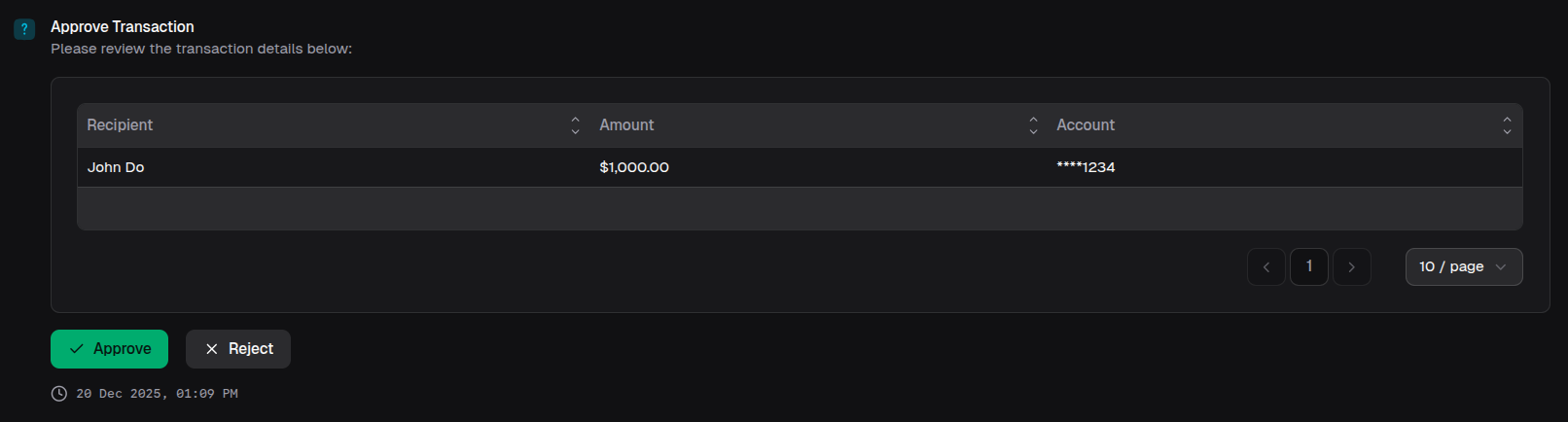
const approve = await io.confirm({
  title: 'Approve Transaction',
  description: 'Please review the transaction details below:',
  block: {
    type: 'table',
    data: [{ Recipient: 'John Do', Amount: '$1,000.00', Account: '****1234' }],
  },
  okButtonLabel: 'Approve',
  cancelButtonLabel: 'Reject',
})