formInput
Creates a multi-field form with multiple inputs at once. All fields are validated together.
Usage

const userInfo = await io.formInput({
  title: 'User Registration',
  description: 'Please fill in your details',
  form: {
    firstName: {
      type: 'text',
      label: 'First Name',
    },
    lastName: {
      type: 'text',
      label: 'Last Name',
    },
    email: {
      type: 'text',
      label: 'Email',
      inputType: 'email',
    },
  },
})
Props
| Prop | Description | Type | Required | Default |
|---|---|---|---|---|
| form | The form definition with named fields | IOFormWithSearchHandler | Yes | — |
| validationSchema | Optional validation schema for the form. If not provided, schemas are inferred from form field definitions | IOFormValidationSchema<T> | No | undefined |
| maxRetryAttempts | Maximum retry attempts for invalid input | number | No | 5 |
| title | Optional title for the form | string | No | undefined |
| description | Optional description for the form | string | No | undefined |
| defaultValues | Optional default values for the form fields | Partial<IOFormOutput<T>> | No | undefined |
Returns
Returns a Promise<IOFormOutput<T>> where T is the form type. TypeScript infers the exact structure from the form definition, preserving field names and types.
Examples
Complete form example

const userInfo = await io.formInput({
  title: 'User Registration',
  form: {
    firstName: { type: 'text', label: 'First Name' },
    lastName: { type: 'text', label: 'Last Name' },
    email: { type: 'text', label: 'Email', inputType: 'email' },
    age: { type: 'number', label: 'Age', min: 18, max: 100 },
    country: {
      type: 'select',
      label: 'Country',
      options: [
        { label: 'United States', value: 'US' },
        { label: 'Canada', value: 'CA' },
      ],
    },
    bio: {
      type: 'text',
      label: 'Biography',
      mode: 'textarea',
      optional: true,
    },
  },
  defaultValues: {
    country: 'US',
  },
})

// TypeScript knows the structure:
// {
//   firstName: string
//   lastName: string
//   email: string
//   age: number
//   country: 'US' | 'CA'
//   bio?: string
// }
Form with search input
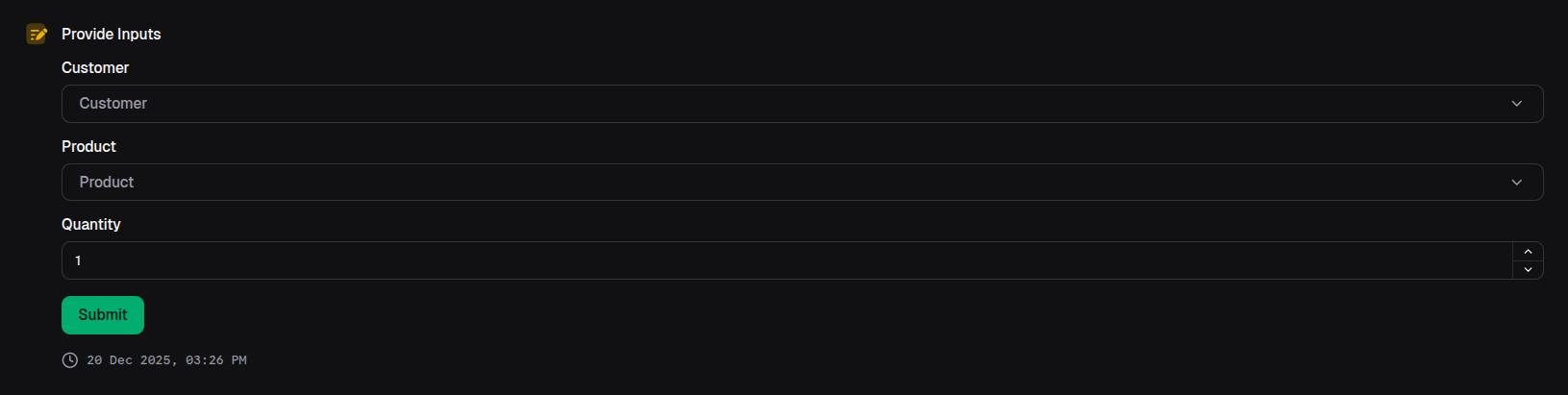
const orderForm = await io.formInput({
  form: {
    customer: {
      type: 'search',
      label: 'Customer',
      handleSearch: async (query) => {
        return await searchCustomers(query)
      },
    },
    product: {
      type: 'search',
      label: 'Product',
      mode: 'multiple',
      handleSearch: async (query) => {
        return await searchProducts(query)
      },
    },
    quantity: {
      type: 'number',
      label: 'Quantity',
      min: 1,
    },
  },
})