selectInput
Prompts the user to select from predefined options. Supports various selection modes.
Usage

const country = await io.selectInput({
  label: 'Country',
  options: [
    { label: 'United States', value: 'US' },
    { label: 'Canada', value: 'CA' },
  ],
})
Props
| Prop | Description | Type | Required | Default |
|---|---|---|---|---|
| label | The label for the select input | string | Yes | — |
| description | The description for the select input | string | No | undefined |
| optional | Whether the select input is optional | boolean | No | false |
| options | The options for the select input. Each option has label, value, and optional description | readonly SelectOption[] | Yes | — |
| mode | The mode of the select input | 'select' | 'multi-select' | 'checkbox' | 'multi-checkbox' | 'radio' | 'radio-card' | No | 'select' |
| maxRetryAttempts | Maximum retry attempts for invalid input | number | No | 5 |
| defaultValue | The default value for the select input | SelectFieldOutput | No | undefined |
Returns
Returns the selected option's value (single select) or array of values (multi-select modes). Return type includes | undefined if optional: true. TypeScript infers the exact union type from the provided options.
Examples
Multi-select
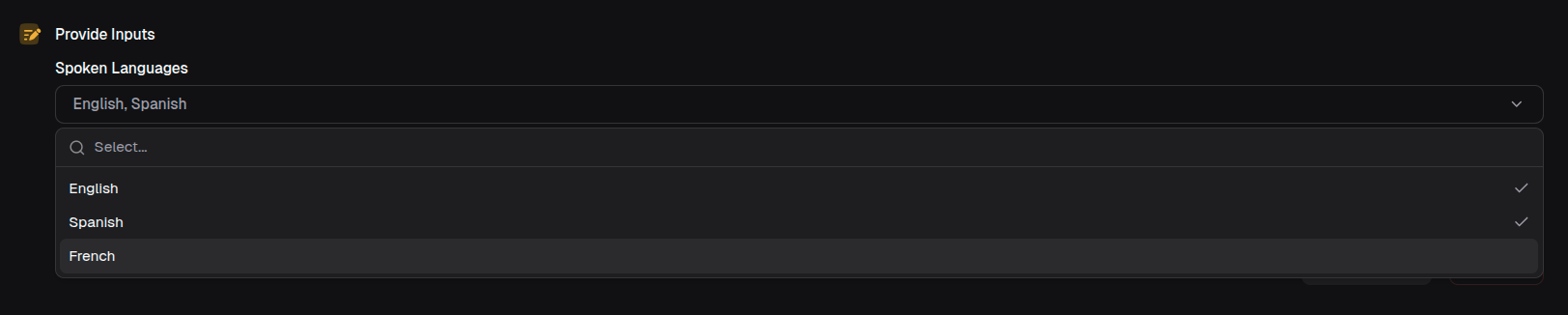
const languages = await io.selectInput({
  label: 'Spoken Languages',
  options: [
    { label: 'English', value: 'en' },
    { label: 'Spanish', value: 'es' },
    { label: 'French', value: 'fr' },
  ],
  mode: 'multi-select',
})

// Returns: ('en' | 'es' | 'fr')[]
Radio buttons
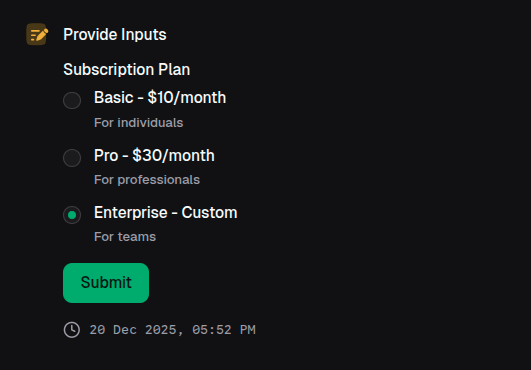
const plan = await io.selectInput({
  label: 'Subscription Plan',
  options: [
    {
      label: 'Basic - $10/month',
      value: 'basic',
      description: 'For individuals',
    },
    {
      label: 'Pro - $30/month',
      value: 'pro',
      description: 'For professionals',
    },
    {
      label: 'Enterprise - Custom',
      value: 'enterprise',
      description: 'For teams',
    },
  ],
  mode: 'radio',
})
Checkboxes
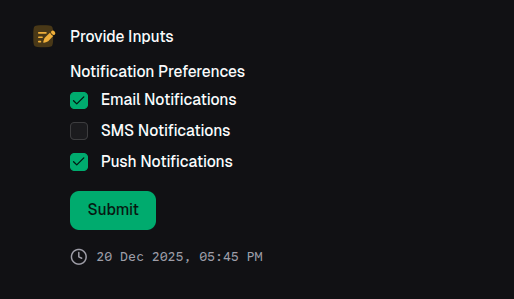
const preferences = await io.selectInput({
  label: 'Notification Preferences',
  options: [
    { label: 'Email Notifications', value: 'email' },
    { label: 'SMS Notifications', value: 'sms' },
    { label: 'Push Notifications', value: 'push' },
  ],
  mode: 'multi-checkbox',
})